
A Developer’s Guide to Software Deployment Strategies
 By opsmoon
Explore modern software deployment strategies from Blue-Green to Canary. Learn how to choose, implement, and monitor the right strategy for safer releases.

Software deployment strategies are frameworks for releasing new code into a production environment. The primary objective is to deliver new features and bug fixes to end-users with minimal disruption and risk. These methodologies range from monolithic, "big bang" updates to sophisticated, gradual rollouts, each presenting a different balance between release velocity and system stability.
From Code Commit to Customer Value
The methodology chosen for software deployment directly impacts application reliability, team velocity, and end-user experience. It is the final, critical step in the CI/CD pipeline that transforms version-controlled code into tangible value for the customer.
A well-executed strategy results in minimal downtime, a reduced blast radius for bugs, and increased developer confidence. This process is a cornerstone of the software release life cycle and is fundamental to establishing a high-performing engineering culture.
This guide provides a technical deep-dive into modern deployment patterns, focusing on the mechanics, architectural prerequisites, and operational trade-offs of each. These strategies are not rigid prescriptions but rather a toolkit of engineering patterns, each suited for specific technical and business contexts.
First, let's establish a high-level overview.
Quick Guide to Modern Deployment Strategies
This table serves as a technical cheat sheet for common deployment strategies. It outlines the core mechanism, ideal technical use case, and associated risk profile for each. Use this as a reference before we dissect the implementation details of each method.
| Strategy | Core Mechanic | Ideal Use Case | Risk Profile |
|---|---|---|---|
| Blue-Green | Two identical, isolated production environments; traffic is atomically switched from the old ("blue") to the new ("green") via a router or load balancer. | Critical applications with zero tolerance for downtime and requiring instantaneous, full-stack rollback. | Low |
| Rolling | The new version incrementally replaces old instances, one by one or in batches, until the entire service is updated. | Stateful applications or monolithic systems where duplicating infrastructure is cost-prohibitive. | Medium |
| Canary | The new version is exposed to a small subset of production traffic; if key SLIs/SLOs are met, traffic is gradually increased. | Validating new features or performance characteristics with real-world traffic before a full rollout. | Low |
| A/B Testing | Multiple versions (variants) are deployed simultaneously; traffic is routed to variants based on specific attributes (e.g., HTTP headers, user ID) to compare business metrics. | Data-driven validation of features by measuring user behavior and business outcomes (e.g., conversion rate). | Low |
| Feature Flag | New code is deployed "dark" (inactive) within the application logic and can be dynamically enabled/disabled for specific user segments without a redeployment. | Decoupling code deployment from feature release, enabling trunk-based development and progressive delivery. | Very Low |
This provides a foundational understanding. Now, let's examine the technical implementation of each strategy.
Mastering Foundational Deployment Strategies
To effectively manage a release process, a deep understanding of the mechanics of foundational software deployment strategies is essential. These patterns are the building blocks for nearly all modern, complex release workflows. We will now analyze the technical implementation, advantages, and disadvantages of four core strategies.
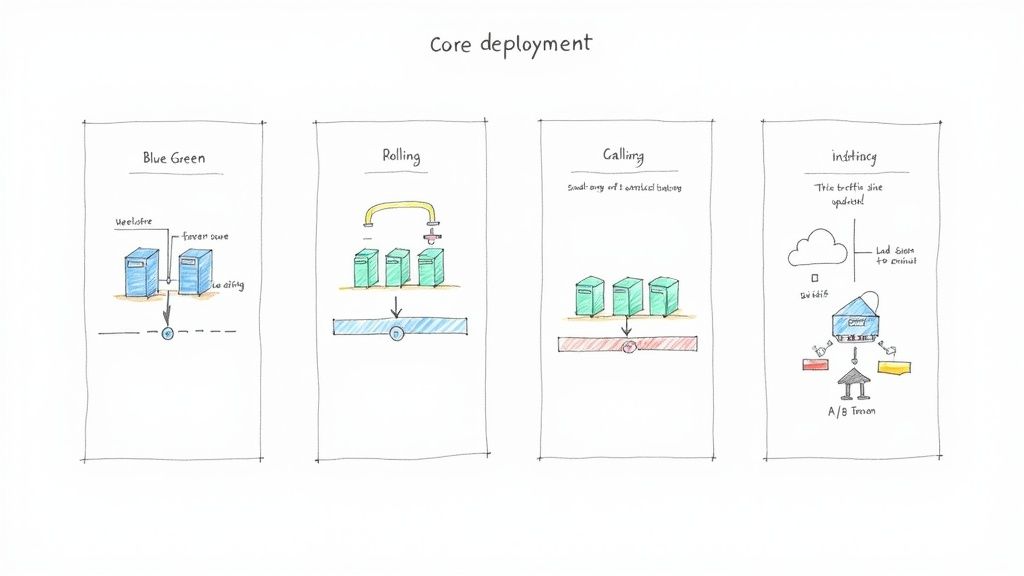
Blue-Green Deployment: The Instant Switch
In a Blue-Green deployment, two identical but separate production environments are maintained: "Blue" (the current version) and "Green" (the new version). Live traffic is initially directed entirely to the Blue environment. The new version of the application is deployed and fully tested in the Green environment, which is isolated from live user traffic but connected to the same production databases and downstream services.
Once the Green environment passes all automated health checks and QA validation, the router or load balancer is reconfigured to atomically switch 100% of traffic from Blue to Green. The Blue environment is kept on standby as an immediate rollback target.
Technical Implementation Example (Pseudo-code for a load balancer config):
# Initial State
backend blue_servers { server host1:80; server host2:80; }
backend green_servers { server host3:80; server host4:80; }
frontend main_app { bind *:80; default_backend blue_servers; }

# After successful Green deployment & testing
# Change one line to switch traffic
frontend main_app { bind *:80; default_backend green_servers; }
Key Takeaway: The Blue-Green strategy minimizes downtime and provides a near-instantaneous rollback mechanism. If post-release monitoring detects issues in Green, traffic is simply rerouted back to the stable Blue environment, which was never taken offline.
Pros of Blue-Green:
- Near-Zero Downtime: The traffic cutover is an atomic operation, making the transition seamless for users.
- Instant Rollback: The old, stable Blue environment remains active, enabling immediate reversion by reconfiguring the router.
- Reduced Risk: The Green environment can undergo a full suite of integration and smoke tests against production data sources before receiving live traffic.
Cons of Blue-Green:
- Infrastructure Cost: Requires maintaining double the production capacity, which can be expensive in terms of hardware or cloud resource consumption.
- Database Schema Management: This is a major challenge. Database migrations must be backward-compatible so that both the Blue and Green versions can operate against the same schema during the transition. Alternatively, a more complex data replication and synchronization strategy is needed.
We explore solutions to these challenges in our guide to zero downtime deployment strategies.
Rolling Deployment: The Gradual Update
A rolling deployment strategy updates an application by incrementally replacing instances of the old version with the new version. This is done in batches (e.g., 20% of instances at a time) or one by one. During the process, a mix of old and new versions will be running simultaneously and serving production traffic.
For example, in a Kubernetes cluster with 10 pods running v1 of an application, a rolling update might terminate two v1 pods and create two v2 pods. The orchestrator waits for the new v2 pods to become healthy (pass readiness probes) before proceeding to the next batch. This continues until all 10 pods are running v2.
This is the default deployment strategy in orchestrators like Kubernetes (strategy: type: RollingUpdate).
Pros of Rolling Deployments:
- Cost-Effective: It does not require duplicating infrastructure, as instances are replaced in-place, making it resource-efficient.
- Simple Implementation: Natively supported by most modern orchestrators and CI/CD tools, making it the easiest strategy to implement initially.
Cons of Rolling Deployments:
- Slower Rollback: If a critical bug is found mid-deployment, rolling back requires initiating another rolling update to deploy the previous version, which is not instantaneous.
- State Management: The co-existence of old and new versions can introduce compatibility issues, especially if the new version requires a different data schema or API contract from downstream services. The application must be designed to handle this state.
- No Clean Cutover: The transition period is extended, which can complicate monitoring and debugging as traffic is served by a heterogeneous set of application versions.
Canary Deployment: The Early Warning System
Canary deployments follow a principle of gradual exposure. The new version of the software is initially released to a very small subset of users (the "canaries"). For example, a service mesh or ingress controller could be configured to route just 1% of production traffic to the new version (v2), while the remaining 99% continues to be served by the stable version (v1).
Key performance indicators (KPIs) and service level indicators (SLIs)—such as error rates, latency, and resource utilization—are closely monitored for the canary cohort. If these metrics remain within acceptable thresholds (SLOs), the traffic percentage routed to the new version is incrementally increased, from 1% to 10%, then 50%, and finally to 100%. If any metric degrades, traffic is immediately routed back to the stable version, minimizing the "blast radius" of the potential issue.
Pros of Canary Deployments:
- Minimal Blast Radius: Issues are detected early and impact a very small, controlled percentage of the user base.
- Real-World Testing: Validates the new version against actual production traffic patterns and user behavior, which is impossible to fully replicate in staging.
- Data-Driven Decisions: Promotion of the new version is based on quantitative performance metrics, not just successful test suite execution.
Cons of Canary Deployments:
- Complex Implementation: Requires sophisticated traffic-shaping capabilities from a service mesh like Istio or Linkerd, or an advanced ingress controller.
- Observability is Critical: Requires a robust monitoring and alerting platform capable of segmenting metrics by application version. Without granular observability, the strategy is ineffective.
A/B Testing: The Scientific Approach
While often confused with Canary, A/B testing is a deployment strategy focused on comparing business outcomes, not just technical stability. It is essentially a controlled experiment conducted in production.
In this model, two or more variants of a feature (e.g., version A with a blue button, version B with a green button) are deployed simultaneously. The router or application logic segments users based on specific criteria (e.g., geolocation, user-agent, a specific HTTP header) and directs them to a specific variant.
The objective is not just to ensure stability, but to measure which variant performs better against a predefined business metric, such as conversion rate, click-through rate, or average session duration. The statistically significant "winner" is then rolled out to 100% of users.
Pros of A/B Testing:
- Data-Backed Decisions: Allows teams to validate product hypotheses with quantitative data, removing guesswork from feature development.
- Feature Validation: Measures the actual business impact of a new feature before a full, costly launch.
Cons of A/B Testing:
- Engineering Overhead: Requires maintaining multiple versions of a feature in the codebase and infrastructure, which increases complexity.
- Analytics Requirement: Demands a robust analytics pipeline to accurately track user behavior, segment data by variant, and perform statistical analysis.
Moving Beyond the Basics: Advanced Deployment Patterns
As architectures evolve towards microservices and cloud-native systems, foundational strategies may prove insufficient. Advanced patterns provide more granular control and enable safer testing of complex changes under real-world conditions. These techniques are standard practice for high-maturity engineering organizations.
Feature Flag Driven Deployments
Instead of controlling a release at the infrastructure level (via a load balancer), feature flags (or feature toggles) control it at the application code level. New code paths are wrapped in a conditional block that is controlled by a remote configuration service.
// Example of a feature flag in code
if (featureFlagClient.isFeatureEnabled("new-checkout-flow", userContext)) {
  // Execute the new, refactored code path
  return newCheckoutService.process(order);
} else {
  // Execute the old, stable code path
  return legacyCheckoutService.process(order);
}
This code can be deployed to production with the flag turned "off," rendering the new logic dormant. This decouples the act of code deployment from feature release.
Key Takeaway: Feature flags transfer release control from the CI/CD pipeline to a management dashboard, often accessible by product managers or engineers. This enables real-time toggling of features for specific user segments (e.g., beta users, users in a specific region) without requiring a new deployment.
This transforms a release from a high-stakes deployment event into a low-risk business decision. For a detailed exploration, see our guide on feature toggle management.
Here is an example of a feature flag management dashboard, the new control plane for releases.
From such an interface, teams can define targeting rules, enable or disable features, and manage progressive rollouts entirely independently of the deployment schedule.
Immutable Infrastructure
This pattern mandates that infrastructure components (servers, containers) are never modified after they are deployed. This is often summarized by the "cattle, not pets" analogy.
In the traditional "pets" model, a server (web-server-01) that requires an update is modified in-place via SSH, configuration management tools, or manual patching. With Immutable Infrastructure, if an update is needed, a new server image (e.g., an AMI or Docker image) is created from a base image with the new application version or patch already baked in. A new set of servers is then provisioned from this new image, and the old servers are terminated. The running infrastructure is never altered. This is a core principle behind container orchestrators like Docker and Kubernetes. Acquiring Kubernetes expertise is crucial for implementing this pattern effectively.
Why is this so powerful?
- Eliminates Configuration Drift: By preventing manual, ad-hoc changes to production servers, it guarantees that every environment is consistent and reproducible.
- Simplifies Rollbacks: A rollback is not a complex "undo" operation. It is simply the act of deploying new instances from the last known-good image version.
- High-Fidelity Testing: Since every server is an identical clone from a versioned image, testing environments are much more representative of production, reducing "works on my machine" issues.
Shadow Deployments
A shadow deployment, also known as traffic mirroring, involves forking production traffic to a new version of a service without impacting the live user. A service mesh or a specialized proxy duplicates incoming requests: one copy is sent to the stable, live service, and a second copy is sent to the new "shadow" version.
The end user only ever receives the response from the stable version. The response from the shadow version is discarded or logged for analysis. This technique allows you to test the new version's performance and behavior under the full load of production traffic without any risk to the user experience. You can compare latency, resource consumption, and output correctness between the old and new versions side-by-side.
This pattern is invaluable for:
- Performance Baselining: Directly compare the CPU, memory, and latency profiles of the new version against the old under identical real-world load.
- Validating Correctness: For critical refactors, such as a new payment processing algorithm, you can run the shadow version to ensure its results perfectly match the production version's for every single request before going live.
Dark Launches
A dark launch is the practice of deploying new backend functionality to production but keeping it completely inaccessible to end-users. The new code is live and executing in the production environment "in the dark," often processing real data or handling internal requests.
For example, when replacing a recommendation engine, the new engine can be deployed to run in parallel with the old one. Both engines might process user activity data and generate recommendations, but only the old engine's results are ever surfaced in the UI. This provides the ultimate "test in production" scenario, allowing you to validate the new engine's performance, stability, and accuracy at production scale before a single user is affected. It is ideal for non-UI components like databases, caching layers, APIs, or complex backend services.
The industry's shift towards these cloud-native deployment patterns is significant. Cloud deployments now account for 71.5% of software industry revenues and are projected to grow at a CAGR of 13.8% through 2030. This expansion is driven by the demand for scalable, resilient, and safe release methodologies. More details are available in the full software development market report.
How to Choose Your Deployment Strategy
Selecting an appropriate software deployment strategy is an exercise in managing trade-offs between release velocity, risk, and operational cost. The optimal choice depends on a careful analysis of your application's architecture, business requirements, and team capabilities.
A decision matrix is a useful tool to formalize this process, forcing a systematic evaluation of each strategy against key constraints rather than relying on intuition.
Evaluating Key Technical and Business Constraints
A rigorous decision process begins with asking the right questions. Here are five critical criteria for evaluation:
- Risk Tolerance: What is the business impact of a failed deployment? A bug in an internal admin tool is an inconvenience; an outage in a financial transaction processing system is a crisis. High-risk systems demand strategies with lower blast radii and faster rollback capabilities.
- Infrastructure Cost: What is the budget for cloud or on-premise resources? Strategies like Blue-Green, which require duplicating the entire production stack, have a high operational cost compared to a resource-efficient Rolling update.
- Rollback Complexity: What is the Mean Time To Recovery (MTTR) requirement? A Blue-Green deployment offers an MTTR of seconds via a router configuration change. A Rolling update requires a full redeployment of the old version, resulting in a much higher MTTR.
- Observability Requirements: What is the maturity of your monitoring and alerting systems? Canary deployments are entirely dependent on granular, real-time metrics to detect performance degradations in a small user subset. Without sufficient observability, the strategy is not viable.
- Team Maturity: Does the team possess the skills and tooling to manage advanced deployment patterns? Strategies involving service meshes, feature flagging platforms, and extensive automation require a mature DevOps culture and specialized expertise.
If navigating these trade-offs is challenging, engaging a software engineering consultant can provide strategic guidance and technical expertise.
This decision tree offers a simplified model for selecting a basic pattern.
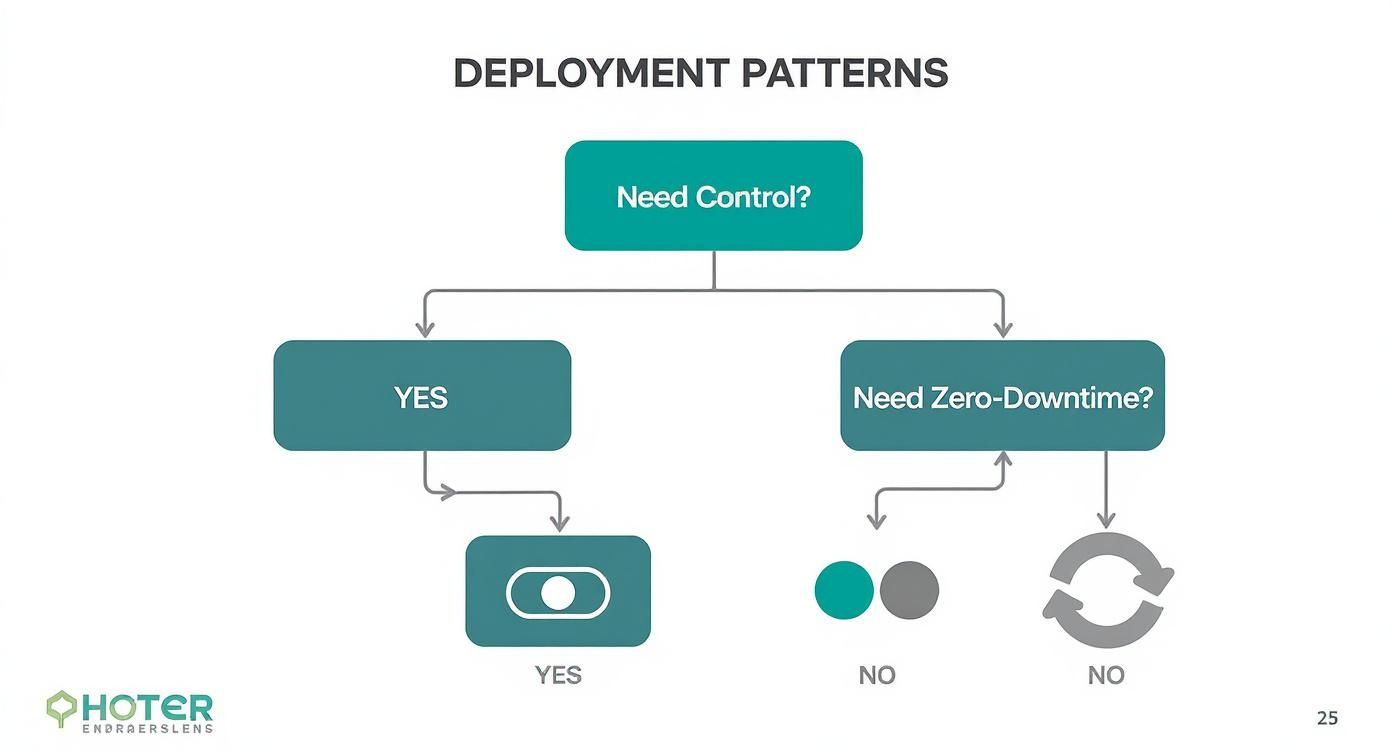
As the diagram illustrates, a requirement for granular user-level control points towards feature flags, while a strict zero-downtime mandate often necessitates a Blue-Green approach.
Making a Data-Driven Choice
Consider a practical example: a high-frequency trading platform where seconds of downtime can result in significant financial loss. Here, the high infrastructure cost of a Blue-Green deployment is a necessary business expense to guarantee instant rollback.
Conversely, an early-stage startup with a monolithic application and limited budget will likely find a standard Rolling update to be the most pragmatic and cost-effective choice.
The global software market, valued at approximately USD 824 billion, shows how these choices play out at scale. On-premises deployments, which still hold the largest market share in sectors like government and finance, often favor more conservative, risk-averse deployment strategies due to security and compliance constraints.
Key Insight: Your deployment strategy is a technical implementation of your business priorities. Select a strategy because it aligns with your specific risk profile, budget, and operational capabilities, not because of industry trends.
Deployment Strategy Decision Matrix
This matrix provides a structured comparison of the most common strategies against the key evaluation criteria.
| Criterion | Blue-Green | Rolling | Canary | Feature Flag |
|---|---|---|---|---|
| Risk Tolerance | Low (Instant rollback) | Medium (Slower rollback) | Very Low (Controlled exposure) | Very Low (Instant off switch) |
| Infra Cost | High (Requires duplicate env) | Low (Reuses existing nodes) | Medium (Needs subset infra) | Low (Code-level change) |
| Rollback Complexity | Very Low (Traffic switch) | High (Requires redeployment) | Low (Route traffic back) | Very Low (Toggle off) |
| Observability | Medium (Compare envs) | Medium (Aggregate metrics) | Very High (Needs granular data) | High (Needs user segmentation) |
| Team Maturity | Medium (Requires infra automation) | Low (Basic CI/CD is enough) | High (Needs advanced monitoring) | Very High (Needs robust framework) |
Use this matrix to guide technical discussions and ensure that the chosen strategy is a deliberate and well-justified decision for your specific context.
Essential Metrics for Safe Deployments
Deploying code without robust observability is deploying blind. An effective deployment strategy is not just about the mechanics of pushing code but about verifying that the new code improves the system's health and delivers value. A tight feedback loop, driven by metrics, transforms a high-risk release into a controlled, data-informed process.
Technical Performance Metrics
These metrics provide an immediate signal of application and infrastructure health. They are the earliest indicators of a regression and are critical for triggering automated rollbacks.
Your monitoring dashboards must prioritize these four signals:
- Application Error Rates: A sudden increase in the rate of HTTP 5xx server errors or uncaught exceptions post-deployment is a primary indicator of a critical bug.
- Request Latency: Monitor the p95 and p99 latency distributions. A regression here, even if the average latency looks stable, indicates that the slowest 5% or 1% of user requests are now slower, which directly impacts user experience.
- Resource Utilization: Track CPU and memory usage. A gradual increase might indicate a memory leak or an inefficient algorithm, leading to performance degradation, system instability, and increased cloud costs over time.
- Container Health: In orchestrated environments like Kubernetes, monitor container restart counts and the status of liveness and readiness probes. A high restart count is a clear sign that the new application version is unstable and repeatedly crashing.
Establishing a clear performance baseline is non-negotiable. Automated quality gates in the CI/CD pipeline should compare post-deployment metrics against this baseline. Any significant deviation should trigger an alert or an automatic rollback.
Business Impact Metrics
While technical metrics confirm the system is running, business metrics confirm it is delivering value. A deployment can be technically flawless but commercially disastrous if it negatively impacts user behavior.
Focus on metrics that reflect user interaction and business goals:
- Conversion Rates: For an e-commerce platform, this is the percentage of sessions that result in a purchase. For a SaaS application, it could be the trial-to-paid conversion rate. A drop here signals a direct revenue impact.
- User Engagement: Track metrics like session duration, daily active users (DAU), or the completion rate of key user journeys. A decline suggests the new changes may have introduced usability issues.
- Abandonment Rates: In transactional flows, monitor metrics like shopping cart abandonment. A sudden spike after deploying a new checkout process is a strong indicator of a problem.
With the global SaaS market projected to reach USD 300 billion with an annual growth rate of 19–20%, the financial stakes of each deployment are higher than ever. More details on these trends can be found in this analysis of SaaS market trends on amraandelma.com.
Tooling for a Crucial Feedback Loop
Effective monitoring requires a dedicated toolchain. Platforms like Prometheus for time-series metric collection, Grafana for visualization and dashboards, and Datadog for comprehensive observability are industry standards.
These tools are not just for visualization; they form the backbone of an automated feedback loop. When integrated into a CI/CD pipeline, they enable automated quality gates that can programmatically halt a faulty deployment before it impacts the entire user base.
Integrating Deployments into Your CI/CD Pipeline
A deployment strategy's effectiveness is directly proportional to its level of automation. Manual execution of Canary or Blue-Green deployments is inefficient, error-prone, and negates many of the benefits. Integrating the chosen strategy into a CI/CD pipeline transforms the release process into a reliable, repeatable, and safe workflow. The pipeline acts as the automated assembly line, with the deployment strategy serving as the final, rigorous quality control station.
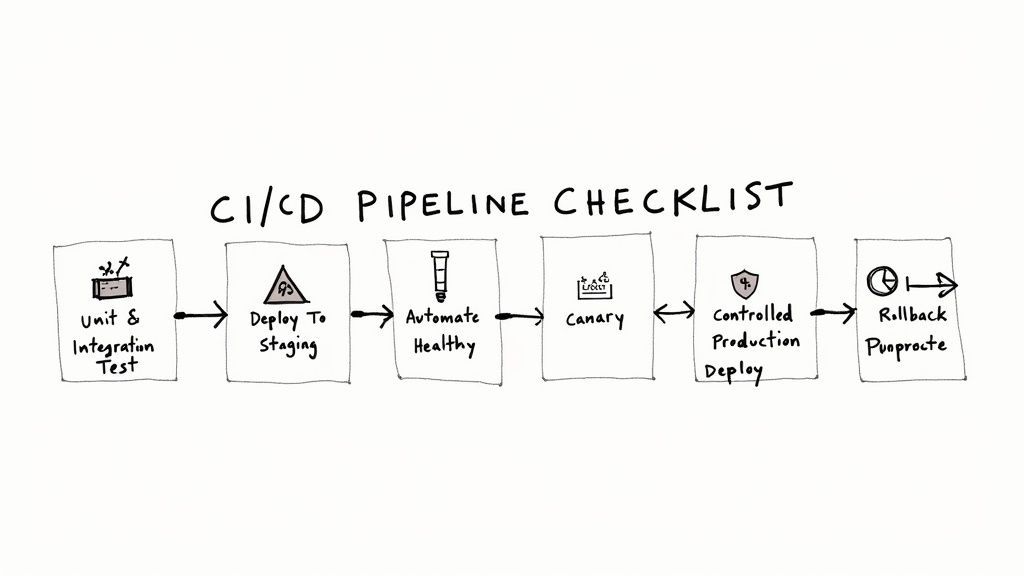
Core Stages of a Modern CI/CD Pipeline
A robust pipeline capable of executing advanced deployment strategies is composed of distinct, automated stages, each serving as a quality gate.
- Build: Source code is checked out from version control (e.g., Git), dependencies are resolved, and the code is compiled into a deployable artifact, typically a versioned Docker container image.
- Unit & Integration Test: A comprehensive suite of automated tests is executed against the newly built artifact in an isolated environment to catch functional bugs early.
- Deploy to Staging: The artifact is deployed to a staging environment that mirrors the production configuration as closely as possible.
- Automated Health Checks: Post-deployment to staging, a battery of automated tests (smoke tests, API contract tests, synthetic user monitoring) is executed to validate core functionality and check for performance regressions.
- Controlled Production Deploy: This is where the chosen deployment strategy is executed. The pipeline orchestrates the traffic shifting for a Canary, provisioning of a Green environment, or the incremental rollout of a Rolling update.
- Promote or Rollback: Based on real-time monitoring against pre-defined Service Level Objectives (SLOs), the pipeline makes an automated decision. If SLIs (e.g., error rate, p99 latency) remain within their SLOs, the deployment is promoted. If any SLO is breached, an automated rollback is triggered.
A Canary Deployment Checklist in Kubernetes
Here is a technical blueprint for implementing a Canary deployment using Kubernetes and a CI/CD tool like GitLab CI. This provides a concrete recipe for automating this strategy.
Key Insight: This process automates risk analysis and decision-making by integrating deployment mechanics with real-time performance monitoring. This is the core principle of a modern Canary deployment.
Here is the implementation structure:
- Containerize the Application: Package the application into a Docker image, tagged with an immutable identifier like the Git commit SHA (
image: my-app:${CI_COMMIT_SHA}). - Create Kubernetes Manifests: Define two separate Kubernetes
Deploymentresources: one for the stable version and one for the canary version. The canary manifest will reference the new container image. Additionally, define a singleServicethat selects pods from both deployments. - Configure the Ingress Controller/Service Mesh: Use a tool like NGINX Ingress or a service mesh (Istio) to manage traffic splitting. Configure the Ingress resource with annotations or a dedicated TrafficSplit object to route a small percentage of traffic (e.g., 5%) to the canary service based on weight.
- Define Pipeline Jobs in
.gitlab-ci.yml:buildjob: Builds and pushes the Docker image to a container registry.testjob: Runs unit and integration tests.deploy_canaryjob: Useskubectl applyto deploy the canary manifest. This job can be set aswhen: manualfor initial deployments to require human approval.promotejob: A timed or manually triggered job that, after a validation period (e.g., 15 minutes), updates the Ingress/TrafficSplit resource to shift 100% of traffic to the new version. It then scales down the old deployment.rollbackjob: A manual or automated job that immediately reverts the Ingress/TrafficSplit configuration and scales down the canary deployment if issues are detected.
- Set Up Monitoring Dashboards: Use tools like Prometheus and Grafana to create a dedicated "Canary Analysis" dashboard. This dashboard must display key SLIs (error rates, latency, saturation) filtered by
serviceandversionlabels to compare the canary's performance directly against the stable version's baseline. - Automate Go/No-Go Decisions: The
promotejob should be more than a simple timer. It must begin by executing a script that queries the monitoring system (e.g., Prometheus via its API). If the canary's error rate is below the defined SLO and p99 latency is within an acceptable range, the script exits successfully, allowing the promotion to proceed. Otherwise, it fails, triggering the pipeline's rollback logic.
Answering Your Deployment Questions
In practice, the distinctions and applications of these strategies can be nuanced. Let's address some common technical questions that arise during implementation.
What's the Real Difference Between Blue-Green and Canary?
The core difference lies in the unit of change and the nature of the transition.
A Blue-Green deployment operates at the environment level. It is a "hot swap" of the entire application stack. Once the new "green" environment is verified, the load balancer re-routes 100% of traffic in a single, atomic operation. The transition is instantaneous and total. The primary benefit is a simple and immediate rollback by reverting the routing rule.
A Canary deployment operates at the request level or session level. It is a gradual, incremental transition. The new version is exposed to a small, controlled percentage of production traffic, and this percentage is increased over time based on performance metrics. The rollback is also immediate (by shifting 100% of traffic back to the old version), but the blast radius of any potential issue is much smaller from the outset.
How Do Feature Flags Fit into All This?
Feature flags operate at the application logic level, providing a finer-grained control mechanism that is orthogonal to infrastructure-level deployment strategies. They decouple code deployment from feature release.
Key Takeaway: You can use a standard Rolling deployment to ship new code to 100% of your servers, but with the associated feature flag turned "off." The new code path is present but not executed. This is a "dark launch."
From a management dashboard, the feature can then be enabled for specific user segments (e.g., internal employees, beta testers, users in a certain geography). This allows you to perform a Canary-style release or an A/B test at the feature level, controlled by application logic rather than by infrastructure routing rules.
Can You Mix and Match These Strategies?
Yes, and combining strategies is a common practice in mature organizations to create highly resilient and flexible release processes.
A powerful hybrid approach is to combine Blue-Green with Canary. In this model, you use the Blue-Green pattern to provision a complete, isolated "green" environment containing the new application version. However, instead of performing an atomic 100% traffic switch, you use Canary techniques to gradually bleed traffic from the "blue" environment to the "green" one.
This hybrid model offers the advantages of both:
- The safety and isolation of a completely separate, pre-warmed production environment from the Blue-Green pattern.
- The risk mitigation of a gradual, metrics-driven rollout from the Canary pattern, which minimizes the blast radius if an issue is discovered in the new environment.
At OpsMoon, we architect and implement these deployment strategies daily. Our DevOps engineers specialize in building the robust CI/CD pipelines and automation required to ship code faster and more safely. Book a free work planning session and let us help you design a deployment strategy that fits your technical and business needs.