
Your Practical Guide to Building a Dev Sec Ops Pipeline
 By opsmoon
Build a secure and efficient Dev Sec Ops pipeline from the ground up. This practical guide covers architecture, tools, and actionable steps for CI/CD security.
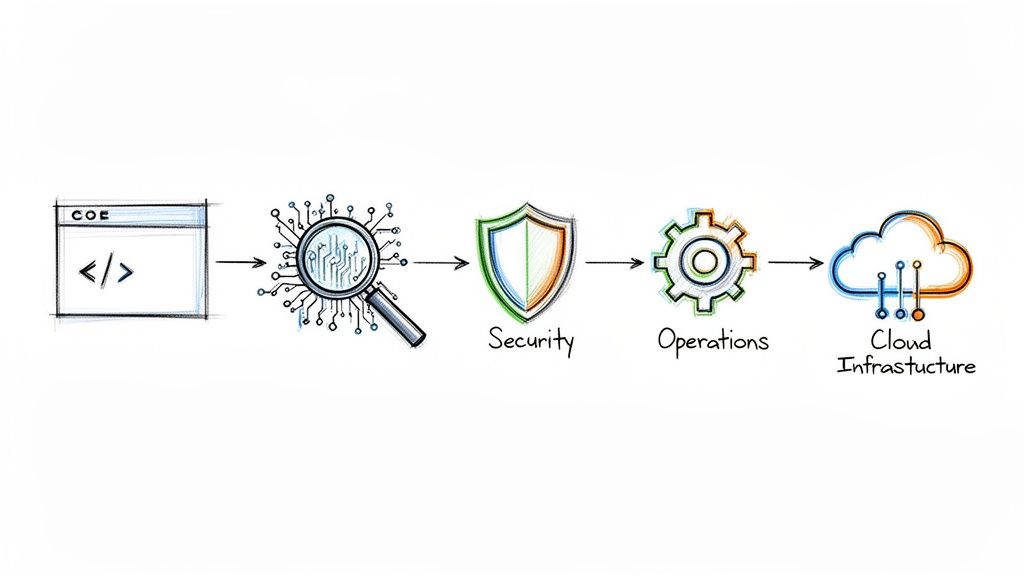
A Dev Sec Ops pipeline is a standard CI/CD pipeline augmented with automated security controls. It's not a single product but a cultural and technical methodology that integrates security testing and validation into every stage of the software delivery lifecycle. The core principle is to make security a shared responsibility, with automated guardrails that provide developers with immediate feedback from the first commit through to production deployment.
This integration prevents security from becoming a late-stage bottleneck, enabling teams to deliver secure software at the velocity demanded by modern DevOps.
Why Your DevOps Pipeline Needs Security Built In
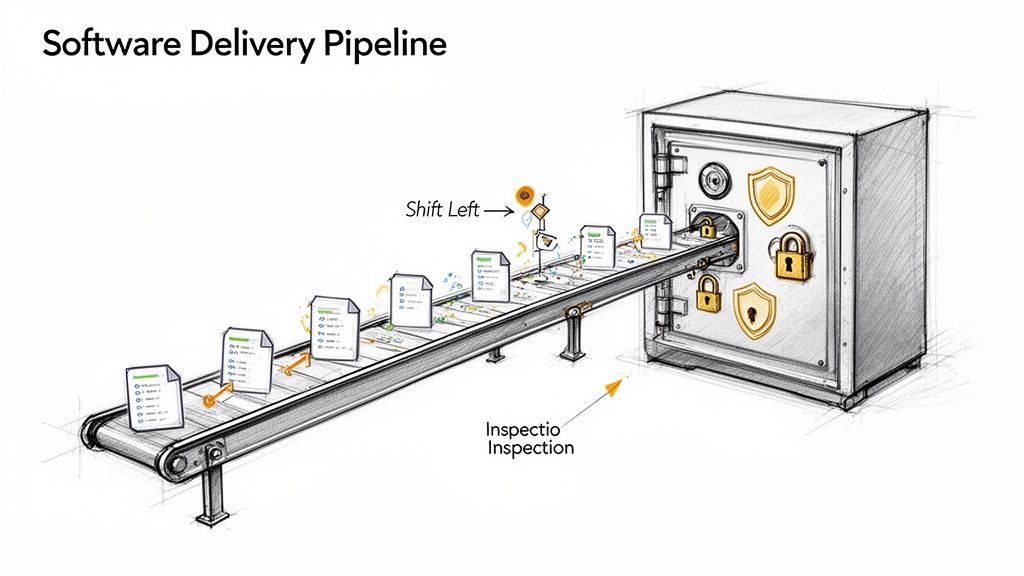
In traditional software development lifecycles (SDLC), security validation was an isolated, manual process conducted just before release. This model is incompatible with the speed and automation of DevOps. Discovering critical vulnerabilities at the end of the cycle introduces massive rework, delays releases, and inflates remediation costs exponentially. DevSecOps addresses this inefficiency by embedding automated security validation throughout the pipeline.
Consider the analogy of constructing a secure facility. You wouldn't erect the entire structure and then attempt to retrofit reinforced walls and vault doors. Security must be an integral part of the initial architectural design. A Dev Sec Ops pipeline applies this same engineering discipline to software, making security a non-negotiable, automated component of the development process.
The Power of Shifting Left
The core technical strategy of DevSecOps is "shifting left." This refers to moving security testing to the earliest possible points in the development lifecycle. When a developer receives immediate, automated feedback on a potential vulnerability—directly within their IDE or via a failed commit hook—they can remediate it instantly while the context is fresh.
Shifting left transforms security from a gatekeeper into a guardrail. It empowers developers to build securely from the start, rather than just pointing out flaws at the end. This collaborative approach is essential for building a strong security posture.
This proactive, automated approach yields significant technical and business advantages:
- Reduced Remediation Costs: Finding and fixing a vulnerability during development is orders of magnitude cheaper than patching it in a production environment post-breach.
- Increased Development Velocity: Automating security gates eliminates manual security reviews, removing bottlenecks and enabling faster, more predictable release cadences.
- Improved Security Culture: Security ceases to be the exclusive domain of a separate team and becomes a shared engineering responsibility, fostering collaboration between development, security, and operations.
A Growing Business Necessity
The adoption of secure pipelines is a direct response to the escalating complexity of cyber threats. The DevSecOps market was valued at USD 4.79 billion in 2022 and is projected to reach USD 45.76 billion by 2031. This growth underscores the critical need for organizations to integrate proactive security measures to protect their applications and data.
Adopting a security architecture like Zero Trust security is a foundational element. This model operates on the principle of "never trust, always verify," assuming that threats can originate from anywhere. Combining this architectural philosophy with an automated DevSecOps pipeline creates a robust, multi-layered defense system.
Deconstructing the Modern DevSecOps Pipeline
A modern DevSecOps pipeline is not a monolithic tool but a series of automated security gates integrated into an existing CI/CD workflow. Each gate is a specific type of security scan designed to detect different classes of vulnerabilities at the most appropriate stage of the software delivery process.
This layered security strategy ensures comprehensive coverage. By automating these checks, you codify security policy and make it a consistent, repeatable part of every code change. Developers receive actionable feedback within their existing workflow, enabling them to resolve issues efficiently without waiting for manual security reviews.
Let's dissect the core technical components that form this automated security assembly line.
SAST: The Code Blueprint Inspector
Static Application Security Testing (SAST) is one of the earliest gates in the pipeline. It functions as a "white-box" testing tool, analyzing the application's source code, bytecode, or binary without executing it. SAST tools build a model of the application's control and data flows to identify potential security vulnerabilities.
Integrated directly into the CI process, SAST scans are triggered on every commit or pull request. They excel at detecting a wide range of implementation-level bugs, including:
- SQL Injection Flaws: Identifying unsanitized user inputs being concatenated directly into database queries.
- Buffer Overflows: Detecting code patterns that could allow writing past the allocated boundaries of a buffer in memory.
- Hardcoded Secrets: Finding sensitive data like API keys, passwords, or cryptographic material embedded directly in the source code.
By providing immediate feedback on coding errors, SAST not only prevents vulnerabilities from being merged but also serves as a continuous training tool for developers on secure coding practices.
SCA: The Supply Chain Manager
Modern applications are assembled, not just written. They rely heavily on open-source libraries and third-party dependencies. Software Composition Analysis (SCA) automates the management of this software supply chain by inventorying all open-source components and their licenses.
The primary function of an SCA tool is to compare the list of project dependencies (e.g., from package.json, pom.xml, or requirements.txt) against public and private databases of known vulnerabilities (like the National Vulnerability Database's CVEs). If a dependency has a disclosed vulnerability, the SCA tool flags it, specifies the vulnerable version range, and often suggests the minimum patched version to upgrade to. It also helps enforce license compliance policies, preventing the use of components with incompatible or restrictive licenses.
DAST: The On-Site Stress Test
While SAST analyzes the code from the inside, Dynamic Application Security Testing (DAST) tests the running application from the outside. It is a "black-box" testing methodology, meaning the scanner has no prior knowledge of the application's internal structure or source code. It interacts with the application as a malicious user would, sending a variety of crafted inputs and analyzing the responses to identify vulnerabilities.
DAST is your reality check. It doesn't care what the code is supposed to do; it only cares about what the running application actually does when it's poked, prodded, and provoked in a live environment.
DAST is highly effective at finding runtime and configuration-related issues that are invisible to SAST, such as:
- Cross-Site Scripting (XSS): Identifying where unvalidated user input is reflected in HTTP responses, allowing for malicious script execution.
- Server Misconfigurations: Detecting insecure HTTP headers, exposed administrative interfaces, or verbose error messages that leak information.
- Broken Authentication: Probing for weaknesses in session management, credential handling, and access control logic.
These testing methods are complementary; a mature pipeline uses both SAST and DAST to achieve comprehensive security coverage.
Key Security Testing Methods in a DevSecOps Pipeline
| Testing Method | Primary Purpose | Pipeline Stage | Typical Vulnerabilities Found |
|---|---|---|---|
| SAST | Scans raw source code to find vulnerabilities before the application runs. | Commit/Build | SQL Injection, Buffer Overflows, Hardcoded Secrets, Insecure Coding Practices |
| DAST | Tests the live, running application from an attacker's perspective. | Test/Staging | Cross-Site Scripting (XSS), Server Misconfigurations, Broken Authentication/Session Management |
| SCA | Identifies known vulnerabilities in open-source and third-party libraries. | Build/Deploy | Outdated Dependencies with known CVEs, Software License Compliance Issues |
| IaC Scanning | Analyzes infrastructure code templates for security misconfigurations. | Commit/Build | Public S3 Buckets, Overly Permissive Firewall Rules, Insecure IAM Policies |
Using these tools in concert creates a multi-layered defense that is far more effective than relying on a single testing technique.
IaC and Container Scanning
Modern applications run on infrastructure defined as code and are often packaged as containers. Securing these components is as critical as securing the application code itself. Infrastructure as Code (IaC) Scanning applies the "shift left" principle to cloud infrastructure. Tools like Checkov or TFSec analyze Terraform, CloudFormation, or Kubernetes manifests for misconfigurations—such as publicly accessible S3 buckets or unrestricted ingress rules—before they are provisioned.
Similarly, Container Scanning inspects container images for known vulnerabilities within the OS packages and application dependencies they contain. This critical step ensures the runtime environment itself is free from known exploits. Industry data shows significant adoption, with about half of DevOps teams already scanning containers and 96% acknowledging the need for greater security automation. You can discover insights into DevSecOps statistics to explore these trends further.
Together, these automated scanning stages create a robust, layered defense that secures the entire software delivery stack, from code to cloud.
Designing Your Dev Sec Ops Pipeline Architecture
Implementing a DevSecOps pipeline involves strategically inserting automated security gates into your existing CI/CD process. The objective is to create a seamless, automated workflow where security is validated at each stage, providing rapid feedback without impeding development velocity.
A well-architected pipeline aligns with established CI/CD pipeline best practices and treats security as an integral quality attribute, not an external dependency. Let's outline a technical blueprint for a modern Dev Sec Ops pipeline.
The diagram below illustrates how distinct security stages are mapped to the development lifecycle, ensuring continuous validation from local development to production monitoring.
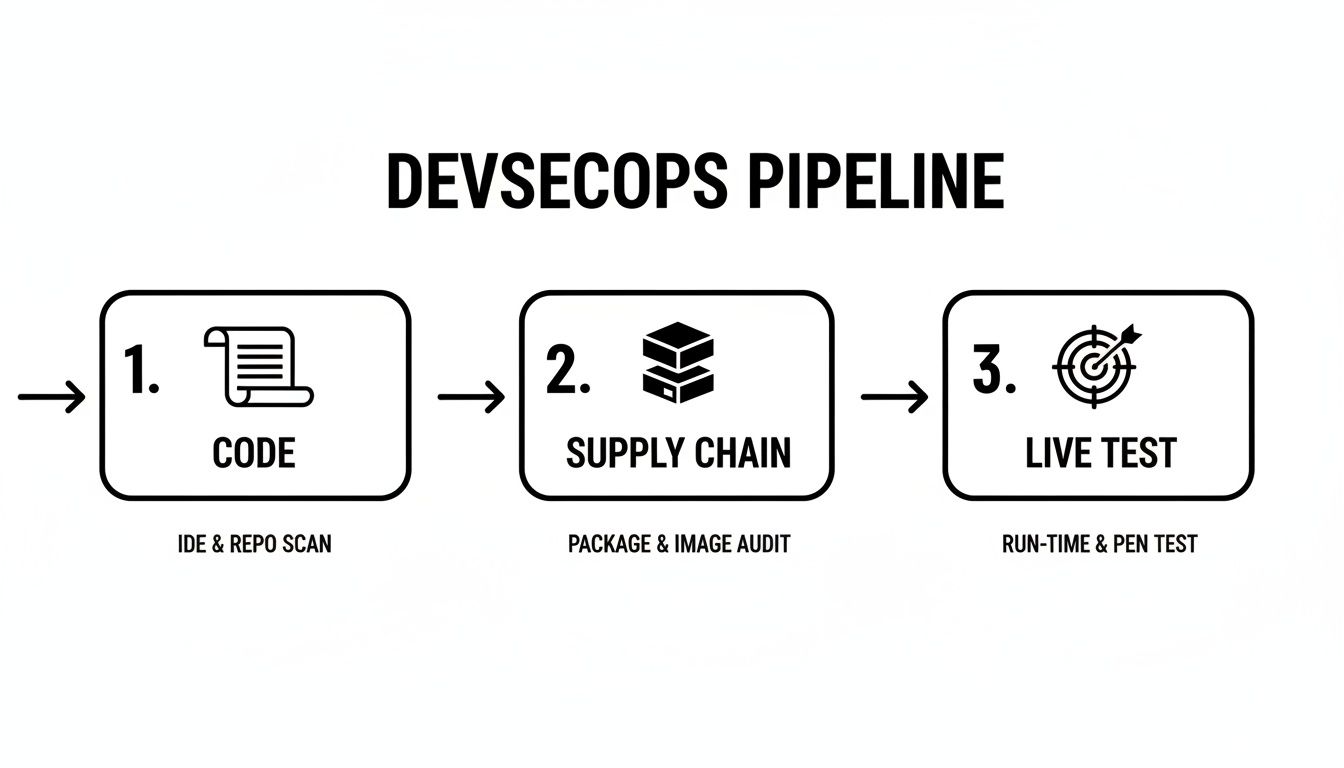
This model emphasizes that security is not a single gate but a continuous process, with each stage building upon the last to create a resilient and secure application.
Stage 1: Pre-Commit and Local Development
True "shift left" security begins on the developer's machine before code is ever pushed to a shared repository. This stage focuses on providing the tightest possible feedback loop.
- IDE Security Plugins: Modern IDEs can be extended with plugins that provide real-time security analysis as code is written, flagging common vulnerabilities and anti-patterns instantly.
- Pre-Commit Hooks: These are Git hooks—small, executable scripts—that run automatically before a commit is finalized. They are ideal for fast, deterministic checks like secrets scanning. A hook can prevent a developer from committing code containing credentials like API keys or database connection strings.
This initial layer of defense is highly effective at preventing common, high-impact errors from entering the codebase.
Stage 2: Commit and Build
When a developer pushes code to a version control system like Git, the Continuous Integration (CI) process is triggered. This is where the core automated security testing is executed.
This stage is your primary quality gate. Any code merged into the main branch gets automatically scrutinized, ensuring the collective codebase stays clean and secure with every single contribution.
The essential security gates at this point include:
- Static Application Security Testing (SAST): The CI job invokes a SAST scanner on the newly committed code. The tool analyzes the source for vulnerabilities like SQL injection, insecure deserialization, and weak cryptographic implementations.
- Software Composition Analysis (SCA): Concurrently, an SCA tool scans dependency manifest files (e.g.,
package.json,pom.xml). It identifies any third-party libraries with known CVEs and can also check for license compliance issues.
For these gates to be effective, the CI build must be configured to fail if a critical or high-severity vulnerability is detected. This provides immediate, non-negotiable feedback to the development team that a serious issue must be addressed.
Stage 3: Test and Staging
After the code is built and packaged into an artifact (e.g., a container image), it is deployed to a staging environment that mirrors production. Here, the application is tested in a live, running state.
This is the ideal stage for Dynamic Application Security Testing (DAST). A DAST scanner interacts with the application's exposed interfaces (e.g., HTTP endpoints) and attempts to exploit runtime vulnerabilities. It can identify issues like Cross-Site Scripting (XSS), insecure cookie configurations, or server misconfigurations that are only detectable in a running application.
Stage 4: Deploy and Monitor
Once an artifact has passed all preceding security gates, it is approved for deployment to production. However, security does not end at deployment. The focus shifts from pre-emptive testing to continuous monitoring and real-time threat detection.
Key activities in this final stage are:
- Container Runtime Security: These tools monitor the behavior of running containers for anomalous activity, such as unexpected process executions, network connections, or file system modifications. This provides a defense layer against zero-day exploits or threats that bypassed earlier checks.
- Continuous Observability: Security information and event management (SIEM) systems ingest logs, metrics, and traces from applications and infrastructure. This centralized visibility allows security teams to monitor for indicators of compromise, analyze security events, and respond quickly to incidents.
Your Step-By-Step Implementation Plan
Transitioning to a secure pipeline is a methodical process. A common failure pattern is attempting a "big bang" implementation by deploying numerous security tools simultaneously. This approach overwhelms developers, kills productivity, and creates cultural resistance.
A phased, iterative approach is far more effective. This roadmap is structured in four distinct stages, beginning with foundational controls that provide the highest return on investment and progressively building a mature DevSecOps pipeline.
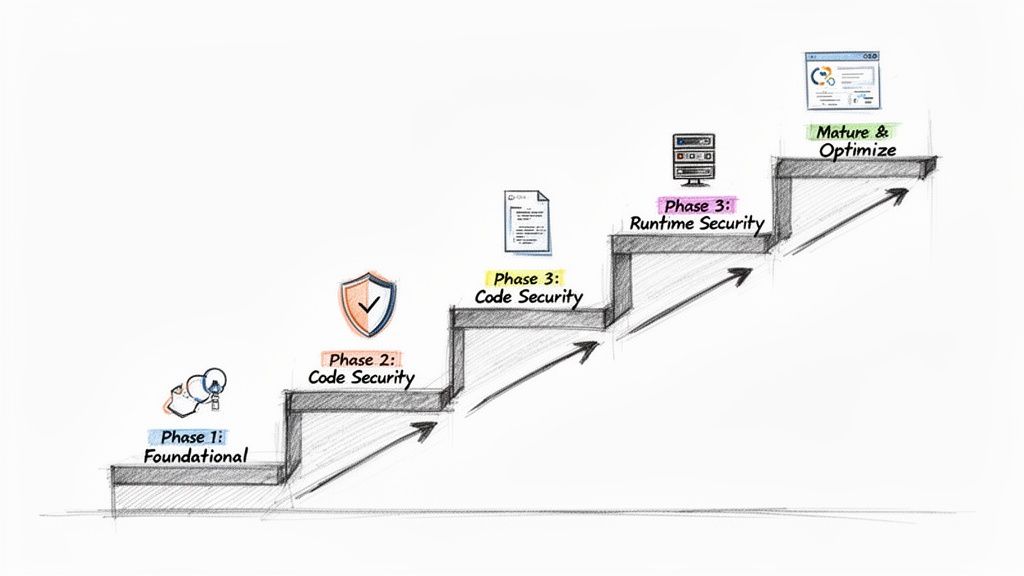
This step-by-step progression allows your team to adapt to new tools and processes incrementally, fostering a culture of security rather than just enforcing compliance.
Phase 1: Establish Foundational Controls
Begin by addressing the most common and damaging sources of breaches: vulnerable dependencies and exposed secrets. Securing these provides immediate and significant risk reduction.
Your primary objectives:
- Software Composition Analysis (SCA): Integrate an SCA tool like Snyk or the open-source OWASP Dependency-Check into your CI build process. This provides immediate visibility into known vulnerabilities within your software supply chain.
- Secrets Scanning: Implement a secrets scanner like TruffleHog or git-secrets as a pre-commit hook. This is a critical first line of defense that prevents credentials from ever being committed to your version control history.
Focusing on these two controls first dramatically reduces your attack surface with minimal disruption to developer workflows.
Phase 2: Automate Code-Level Security
With your dependencies and secrets under control, the next step is to analyze the code your team writes. The goal is to provide developers with fast, automated feedback on security vulnerabilities within their existing workflow. This is the core function of Static Application Security Testing (SAST).
Bringing SAST into the pipeline is a game-changer. It fundamentally shifts security left, putting the power and context to fix vulnerabilities directly in the hands of the developer, right inside their existing workflow.
Your mission is to integrate a SAST tool like SonarQube or Checkmarx to run automatically on every pull request. A key technical best practice is to configure the build to fail only for high-severity, high-confidence findings initially. This minimizes alert fatigue and ensures that only actionable, high-impact issues interrupt the CI process.
This tight feedback loop is the heart of any effective DevSecOps CI/CD process.
Phase 3: Secure Your Runtime Environments
With application code and its dependencies being scanned, the focus now shifts to the runtime environment. This phase addresses the security of the running application and the underlying infrastructure.
The key security gates to add:
- Dynamic Application Security Testing (DAST): After deploying to a staging environment, execute a DAST scan using a tool like OWASP ZAP. This is essential for detecting runtime vulnerabilities like Cross-Site Scripting (XSS) and other configuration-related issues that SAST cannot identify.
- Infrastructure as Code (IaC) Scanning: Integrate an IaC scanner like Checkov or TFSec into your pipeline. This tool should analyze your Terraform or CloudFormation templates for cloud misconfigurations—such as public S3 buckets or overly permissive IAM policies—before they are ever applied.
Phase 4: Mature and Optimize
With the core automated gates in place, the final phase focuses on process refinement and proactive security measures. This is where you move from a reactive to a predictive security posture.
Key activities for this stage include:
- Threat Modeling: Systematically conduct threat modeling sessions during the design phase of new features. This practice helps identify potential architectural-level security flaws before any code is written.
- Centralized Dashboards: Aggregate findings from all security tools (SAST, DAST, SCA, IaC) into a centralized vulnerability management platform. A tool like DefectDojo provides a single pane of glass for viewing and managing your organization's overall risk posture.
- Alert Tuning: Continuously refine the rulesets and policies of your security tools to reduce false positives. The objective is to ensure that every alert presented to a developer is high-confidence, relevant, and actionable, thereby building trust in the automated system.
Recommended Tooling for Each Pipeline Stage
| Pipeline Stage | Security Practice | Open-Source Tools | Commercial Tools |
|---|---|---|---|
| Pre-Commit | Secrets Scanning | git-secrets, TruffleHog | GitGuardian, GitHub Advanced Security |
| CI / Build | Software Composition Analysis (SCA) | OWASP Dependency-Check, CycloneDX | Snyk, Veracode, Mend.io |
| CI / Build | Static Application Security (SAST) | SonarQube, Semgrep | Checkmarx, Fortify |
| CI / Build | IaC Scanning | Checkov, TFSec, Kics | Prisma Cloud, Wiz |
| Staging / Test | Dynamic Application Security (DAST) | OWASP ZAP | Burp Suite Enterprise, Invicti |
| Production | Runtime Protection & Observability | Falco, Wazuh | Sysdig, Aqua Security, Datadog |
The optimal tool selection depends on your specific technology stack, team expertise, and budget. A common strategy is to begin with open-source tools to demonstrate value and then graduate to commercial solutions for enhanced features, enterprise support, and scalability.
Measuring the Success of Your DevSecOps Pipeline
Implementing a DevSecOps pipeline requires significant investment. To justify this effort, you must demonstrate its value through objective metrics. Simply counting the number of vulnerabilities found is a superficial vanity metric; true success is measured by improvements in both security posture and development velocity.
The goal is to transition from stating "we are performing security activities" to proving "we are shipping more secure software faster." This requires tracking specific Key Performance Indicators (KPIs) that connect security automation directly to business and engineering outcomes.
Core Security Metrics That Matter
To evaluate the effectiveness of your security gates, you must track metrics that reflect both remediation efficiency and preventive capability. These KPIs provide insight into the performance of your security program within the CI/CD workflow.
Key metrics to monitor:
- Mean Time to Remediate (MTTR): This measures the average time from vulnerability detection to remediation. A consistently decreasing MTTR is a strong indicator that "shifting left" is effective, as developers are identifying and fixing issues earlier and more efficiently.
- Vulnerability Escape Rate: This KPI tracks the percentage of vulnerabilities discovered in production (e.g., via bug bounty or penetration testing) versus those identified pre-production by the automated pipeline. A low escape rate validates the effectiveness of your automated security gates.
- Vulnerability Density: This metric calculates the number of vulnerabilities per thousand lines of code (KLOC). Tracking this over time can indicate the adoption of secure coding practices and the overall improvement in code quality.
Connecting Security to DevOps Performance
A mature DevSecOps pipeline should not only enhance security but also support or even accelerate core DevOps objectives. Security automation should function as an enabler of speed, not a blocker.
The ultimate goal is to make security and speed allies, not adversaries. When your security practices help improve deployment frequency and lead time, you have achieved true DevSecOps maturity.
The business value of this alignment is substantial. While improved security and quality is the primary driver for adoption (54% of adopters), faster time-to-market is also a key benefit (30%). The data is compelling, with elite-performing teams achieving 96x faster issue remediation in some cases. You can learn more about how top-performing teams measure DevOps success.
Tools for Tracking and Visualization
Effective measurement requires data aggregation and visualization. The key is to consolidate security data into a unified dashboard to track KPIs. Tools like DefectDojo are designed for this purpose, ingesting findings from various scanners (SAST, DAST, SCA) to provide a single source of truth for vulnerability management.
Many modern CI/CD platforms like GitLab or Azure DevOps also offer built-in security dashboards that provide visibility into pipeline health. These tools empower engineering leaders to identify trends, pinpoint bottlenecks, and make data-driven decisions. This practice aligns with a broader strategy of engineering productivity measurement, fostering a culture of transparency and continuous improvement.
Navigating Common DevSecOps Implementation Pitfalls
Even a well-designed plan for a DevSecOps pipeline can encounter significant challenges during implementation. Anticipating these common pitfalls is key to a successful adoption. A successful strategy requires addressing not just technology but also people and processes.
Let's examine the three most prevalent obstacles and discuss practical, technical strategies to overcome them.
Taming Tool Sprawl
A frequent initial mistake is "tool sprawl"—the ad-hoc accumulation of disconnected security tools. This leads to data silos, inconsistent reporting, and a high maintenance burden. Each tool introduces its own dashboard, alert format, and learning curve, resulting in engineer burnout and inefficient workflows.
The solution is to adopt a unified toolchain strategy. Before integrating any new tool, evaluate it against these technical criteria:
- API-First Integration: Does the tool provide a robust API for exporting findings in a standardized format (e.g., SARIF)? Can it be integrated into a central vulnerability management platform?
- CI/CD Automation: Can the tool be executed and configured entirely via the command line within a CI/CD job without manual intervention?
- Unique Value Proposition: Does it provide a capability not already covered by existing tools, or does it offer a significant improvement in accuracy or performance?
Prioritizing integration capabilities over standalone features ensures you build a cohesive, interoperable system rather than a collection of disparate parts.
Combating Alert Fatigue
Alert fatigue is the single greatest threat to the success of a DevSecOps program. It occurs when developers are inundated with a high volume of low-priority, irrelevant, or false-positive security findings. When overwhelmed, they begin to ignore all alerts, allowing critical vulnerabilities to be missed.
A security alert should be a signal, not static. If developers don't trust the alerts they receive, the entire feedback loop breaks down, and security reverts to being an ignored afterthought.
To combat this, you must aggressively tune your scanning tools.
- Customize Rulesets: Disable rules that are not applicable to your technology stack or that consistently produce false positives in your codebase.
- Incremental Scanning: Configure scanners to analyze only the code changes within a pull request ("delta scanning") rather than rescanning the entire repository on every commit. This provides faster, more relevant feedback.
- Risk-Based Gating: Implement a policy where builds are failed only for critical or high-severity vulnerabilities. Lower-severity findings should automatically generate a ticket in the project backlog for later review, allowing the pipeline to proceed.
Overcoming Cultural Resistance
The most significant challenge is often cultural, not technical. If developers perceive security as a separate, bureaucratic function that impedes their work, they will resist adoption. Successful DevSecOps requires security to be a shared responsibility, integrated into the engineering culture as a core aspect of quality.
The most effective strategy for fostering this cultural shift is to establish a Security Champions program. Identify developers within each team who have an interest in security. Provide them with advanced training and empower them to be the primary security liaisons for their teams.
These champions act as a crucial bridge, translating security requirements into a developer-centric context and providing the central security team with valuable feedback from the development front lines. This grassroots, collaborative approach builds trust and transforms security from an external mandate into an internal, shared objective.
Answering Your DevSecOps Questions
Even with a detailed roadmap, practical questions will arise during the implementation of a DevSecOps pipeline. Here are answers to some of the most common technical and strategic questions from engineering teams.
How Can a Small Team with a Limited Budget Start a DevSecOps Pipeline?
For small teams, the key is to prioritize high-impact, low-cost controls using open-source tools. You can build a surprisingly effective foundational pipeline with zero licensing costs.
Here is the most efficient starting point:
- Implement Pre-Commit Hooks for Secrets Scanning: Use a tool like
git-secrets. This is a free, simple script that can be configured as a Git hook to prevent credentials from ever being committed to the repository. This single step mitigates one of the most common and severe types of security incidents. - Integrate Open-Source SCA: Add a tool like OWASP Dependency-Check or Trivy to your CI build script. These tools scan your project's dependencies for known CVEs, providing critical visibility into your software supply chain risk without any cost.
By focusing on just these two controls, you address major risk vectors with minimal engineering overhead. Avoid the temptation to do everything at once; iterative, risk-based implementation is key.
What Is the Best Way to Manage False Positives from SAST Tools?
Effective management of false positives is crucial for maintaining developer trust in your security tooling. It's an ongoing process of tuning and triage, not a one-time fix.
A flood of irrelevant alerts is the fastest way to make developers ignore your security tools. A well-tuned scanner that produces high-confidence findings builds trust and encourages a proactive security culture.
First, dedicate engineering time to the initial and ongoing configuration of your scanner's rulesets. Disable entire categories of checks that are not relevant to your application's architecture or threat model.
Second, establish a clear triage workflow. A best practice is to have a "security champion" or a senior developer review newly identified findings. If an issue is confirmed as a false positive, use the tool's features to suppress that specific finding in that specific line of code for all future scans. This ensures that developers only ever see actionable alerts.
Should We Fail the Build If a Security Scan Finds Any Vulnerability?
No, this is a common anti-pattern. A zero-tolerance policy that fails a build for any vulnerability, regardless of severity, creates excessive friction and positions security as a blocker to productivity.
The technically sound approach is to implement risk-based quality gates. Configure your CI pipeline to automatically fail a build only for 'High' or 'Critical' severity vulnerabilities.
For findings with 'Medium' or 'Low' severity, the pipeline should pass but automatically create a ticket in your issue tracking system (e.g., Jira) with the vulnerability details. This ensures the issue is tracked and prioritized for a future sprint without halting the current release. This balanced approach stops the most dangerous flaws immediately while maintaining development velocity.
Ready to build a resilient and efficient DevSecOps pipeline without the guesswork? OpsMoon connects you with the top 0.7% of remote DevOps engineers to accelerate your projects. Start with a free work planning session to map your roadmap and get matched with the exact expertise you need. Build your expert team with OpsMoon today.