
A Technical Guide to Implementing DevSecOps in Your CI/CD Pipeline
 By opsmoon
Build a secure DevSecOps CI CD pipeline with this technical guide. Learn to integrate SAST, DAST, IaC scanning, and continuous monitoring.
DevSecOps is the practice of integrating automated security testing and validation directly into your Continuous Integration/Continuous Delivery (CI/CD) pipeline. The objective is to make security a shared responsibility from the initial commit, not a bottleneck before release. A properly implemented DevSecOps CI CD pipeline enables faster, more secure software delivery by identifying and remediating vulnerabilities at every stage of the development lifecycle.
Setting the Stage for a Secure Pipeline
Before writing a single line of pipeline code, a foundational strategy is non-negotiable. Teams often jump straight to tool acquisition, only to face friction and slow adoption because the cultural and procedural groundwork was skipped. The initial step is a rigorous technical assessment of your current state.
This journey begins with a detailed DevSecOps maturity assessment. This isn't about assigning blame; it's about generating a data-driven map. You must establish a baseline of your people, processes, and technology to chart an effective course forward.
Performing a DevSecOps Maturity Assessment
A quantitative maturity assessment provides the empirical data needed to justify investments and prioritize initiatives. Move beyond generic checklists and ask specific, technical questions that expose tangible security gaps in your existing CI/CD process.
Analyze these key areas:
- Current Security Integration: At what specific stage do security checks currently execute? Is it a manual pre-release gate, or are there automated scans (e.g., SAST, SCA) integrated into any CI jobs? What is the average time for these jobs to complete?
- Developer Feedback Loop: What is the mean time between a developer committing code with a vulnerability and receiving actionable feedback on it? Is feedback delivered directly in the pull request via a bot comment, or does it arrive days later in an external ticketing system?
- Toolchain and Automation: Catalog all security tools (SAST, DAST, SCA, IaC scanners). Are they invoked via API calls within the pipeline (e.g., a Jenkinsfile or GitHub Actions workflow), or are they run manually on an ad-hoc basis? What percentage of builds include automated security scans?
- Incident Response & Patching Cadence: When a CVE is discovered in a production dependency, what is the Mean Time to Remediate (MTTR)? Can you patch and deploy a fix within hours, or does it require a multi-day or multi-week release cycle?
The answers provide a clear starting point. For example, if the developer feedback loop is measured in days, your immediate priority is not a new scanner, but rather integrating existing tools directly into the pull request workflow to shorten that loop to minutes.
Championing the Shift-Left Security Model
With a baseline established, champion the "shift-left" security model. This is a strategic re-architecture of your security controls. It involves moving security testing from its traditional position as a final, pre-deployment gate to the earliest possible points in the development lifecycle.
The technical goal is to make security validation a native component of a developer's inner loop. When a developer receives a SAST finding as a comment on a pull request, they can fix it in minutes while the code context is fresh. When that same issue is identified weeks later by a separate security audit, the context is lost, increasing the remediation time by an order of magnitude.
Shifting left transforms security from a blocking gate into an enabling guardrail. It provides developers with the immediate, automated feedback they need to write secure code from inception, drastically reducing the cost and complexity of later-stage remediation.
Breaking Down Silos for Shared Responsibility
A successful DevSecOps CI CD culture is predicated on shared responsibility, which is technically impossible in siloed team structures. The legacy model of developers "throwing code over the wall" to Operations and Security teams creates unacceptable bottlenecks and information gaps.
The solution is to form cross-functional teams with embedded security expertise (Security Champions). Define explicit roles (e.g., who is responsible for triaging scanner findings) and establish unified communication channels, such as a dedicated Slack channel with integrations from your CI/CD platform and security tools for real-time alerts. This cultural shift is driving massive market growth, with the DevSecOps market projected to reach $41.66 billion by 2030, underscoring its criticality. You can explore this market data on the Infosec Institute blog.
Fostering a culture where security is a measurable component of everyone's role lays the technical foundation for a pipeline that is both high-velocity and verifiably secure.
Blueprint for a Multi-Stage DevSecOps Pipeline
Theoretical discussion must translate into a technical blueprint. Architecting a modern DevSecOps CI/CD pipeline involves strategically embedding specific, automated security controls at each stage of the software delivery lifecycle.
By decomposing the pipeline into discrete phases—Pre-Commit, Commit/CI, Build, Test, and Deploy—we can implement targeted security validations where they are most effective.
This multi-stage architecture ensures security is not a single, monolithic gate but a series of progressive checkpoints providing developers with fast, contextual feedback. Before layering security automation, ensure you have a firm grasp of the foundational concepts of Continuous Integration and Continuous Delivery (CI/CD), as a robust CI/CD implementation is a prerequisite.
Pre-Commit Stage Security
The earliest and most cost-effective place to detect a vulnerability is on a developer's local machine before the code is ever pushed to a shared repository. Pre-commit hooks are the core mechanism for shifting left to this stage, providing instant feedback and preventing trivial mistakes from entering the pipeline.
The goal is to catch low-hanging fruit with minimal performance impact.
- Secret Scanning: Implement a Git hook using tools like Git-secrets or TruffleHog. These tools scan staged files for patterns matching credentials, API keys, and other secrets. The hook script should block the
git commitcommand with a non-zero exit code if a secret is found. - Code Linting and Formatting: Enforce consistent coding standards using linters (e.g., ESLint for JavaScript, Pylint for Python). While primarily for code quality, linters are effective at identifying insecure code patterns, such as the use of
eval()or weak cryptographic functions.
A pre-commit hook is a script executed by Git before a commit is created. This simple automation, configured in
.git/hooks/pre-commit, can prevent a $5 mistake (a hardcoded key) from becoming a $5,000 incident once exposed in a public repository.
Commit and Continuous Integration Stage
Upon a git push to the central repository, the CI stage is triggered. This is where more resource-intensive, automated security analyses are executed on every commit or pull request. The feedback loop must remain tight; results should be available within minutes.
Key automated checks at this stage include:
- Static Application Security Testing (SAST): SAST tools parse source code, byte code, or binaries to identify security vulnerabilities without executing the application. Integrating a tool like Snyk Code or SonarQube into the CI job provides immediate feedback on flaws like SQL injection or cross-site scripting, often with line-level precision.
- Software Composition Analysis (SCA): Modern applications are composed heavily of open-source dependencies, each representing a potential attack vector. SCA tools like GitHub's Dependabot or OWASP Dependency-Check scan dependency manifests (e.g.,
package.json,pom.xml) against databases of known vulnerabilities (CVEs), flagging outdated or compromised packages.
Configuration files, like the .gitlab-ci.yml shown below, define the pipeline-as-code, ensuring that security jobs like SAST and dependency scanning are executed automatically and consistently.

Build Stage Container Security
With containerization as the standard for application packaging, securing the build artifacts themselves is a critical, non-negotiable step. The build stage is the ideal point to enforce container image hygiene. A single vulnerable base image pulled from a public registry can introduce hundreds of CVEs into your environment.
Focus your efforts here:
- Use Hardened Base Images: Mandate the use of minimal, hardened base images. Options like Distroless (which contain only the application and its runtime dependencies) or Alpine Linux drastically reduce the attack surface by eliminating unnecessary system libraries and shells.
- Vulnerability Image Scanning: Integrate a container scanner such as Trivy or Clair directly into the image build process. The pipeline should be configured to scan the newly built image for known CVEs and fail the build if vulnerabilities exceeding a defined severity threshold (e.g., 'High' or 'Critical') are detected.
Test Stage Dynamic and Interactive Testing
While SAST inspects code at rest, the test stage allows for probing the running application for vulnerabilities that only manifest at runtime. These tests should be executed in a dedicated, ephemeral staging environment alongside functional and integration test suites.
The primary tools for this stage are:
- Dynamic Application Security Testing (DAST): DAST tools operate from the outside-in, simulating attacks against a running application to identify vulnerabilities like insecure endpoint configurations or server misconfigurations. OWASP ZAP can be scripted to perform an automated scan against a deployed application in a test environment as part of the pipeline.
- Interactive Application Security Testing (IAST): IAST agents are instrumented within the application runtime. This inside-out perspective gives them deep visibility into the application's code execution, data flow, and configuration, enabling them to identify complex vulnerabilities with higher accuracy and fewer false positives than SAST or DAST alone.
Deploy Stage Infrastructure and Configuration Checks
Immediately preceding and following deployment, the security focus shifts to the underlying infrastructure. Cloud misconfigurations are a leading cause of data breaches, making this stage critical for securing the runtime environment.
Automated checks for the deploy stage must cover:
- Infrastructure as Code (IaC) Scanning: Before applying any infrastructure changes, scan the IaC definitions (e.g., Terraform, CloudFormation, Ansible). Tools like Checkov or tfsec detect security misconfigurations such as overly permissive IAM roles or publicly exposed storage buckets, preventing them from being provisioned.
- Post-Deployment Configuration Validation: After a successful deployment, run configuration scanners against the live environment. This verifies compliance with security benchmarks, such as those from the Center for Internet Security (CIS), ensuring the deployed state matches the secure state defined in the IaC.
By weaving these specific, automated security checks across all five stages, you architect a resilient DevSecOps CI/CD pipeline that integrates security as a core component of development velocity.
Integrating and Automating Security Tools
A robust DevSecOps CI CD pipeline is defined by its automated, intelligent tooling. The effective integration of security scanners—configured for fast, low-noise feedback—is what makes the DevSecOps model practical. The objective is a seamless validation workflow where security checks are an integral, non-blocking part of the build process.
This diagram illustrates the flow of code through the critical stages of a DevSecOps pipeline, from local pre-commit hooks through automated CI, testing, and deployment.
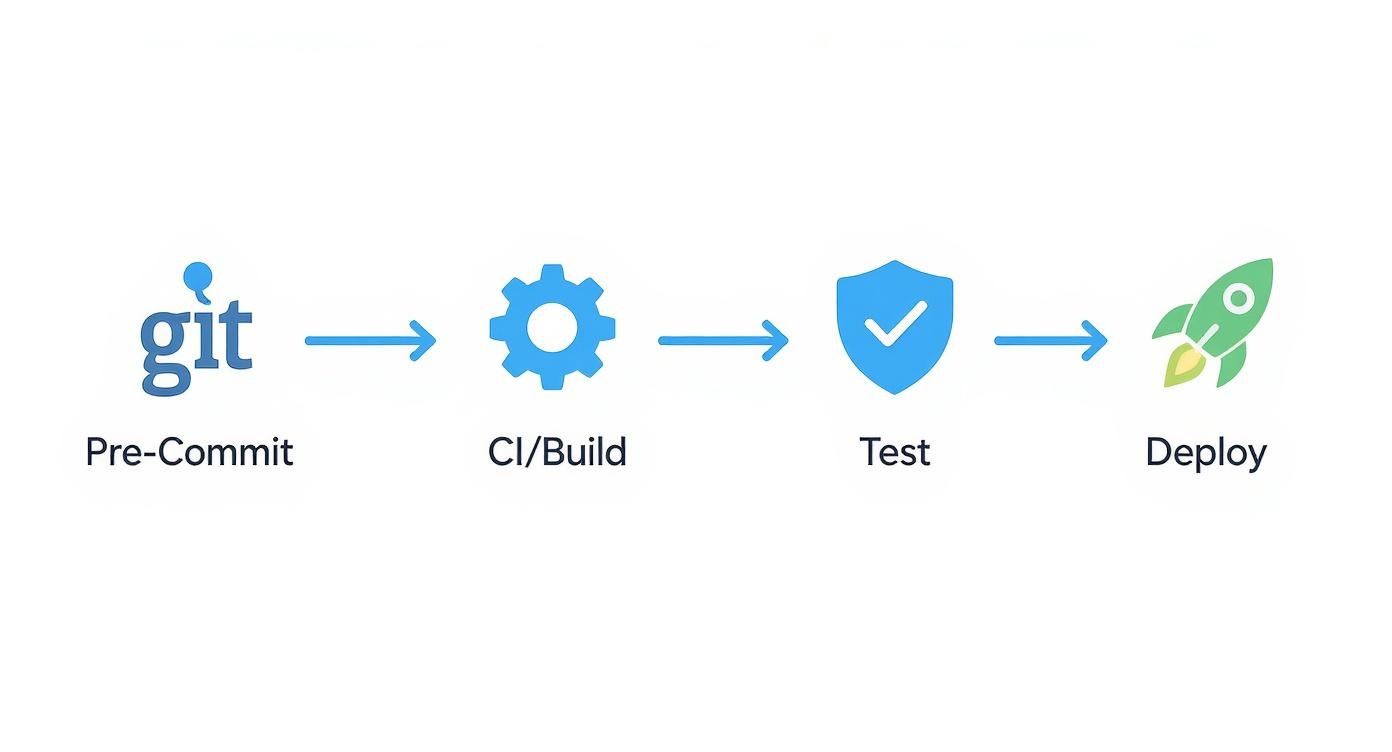
The key architectural principle is the continuous integration of security. Instead of a single gate at the end, different security validations are strategically placed at each phase to detect vulnerabilities at the earliest possible moment.
Choosing the Right Scanners for the Job
Different security scanners are designed to identify different classes of vulnerabilities. Correct tool placement within the pipeline is crucial. Misplacing a tool, such as running a lengthy DAST scan on every commit, creates noise, increases cycle time, and alienates developers.
While the landscape is filled with acronyms, each tool type serves a specific and vital function.
Core DevSecOps Security Tooling Comparison
Consider these tools as layered defenses. Understanding the role of each enables the construction of a resilient, multi-layered security posture.
| Tool Type | Primary Purpose | Best Pipeline Stage | Example Tools |
|---|---|---|---|
| SAST (Static) | Analyzes source code for vulnerabilities before compilation or execution. | Commit/CI | SonarQube, Snyk Code |
| DAST (Dynamic) | Tests the running application from an external perspective, simulating attacks to find runtime vulnerabilities. | Test/Staging | OWASP ZAP, Burp Suite |
| IAST (Interactive) | Uses instrumentation within the running application to identify vulnerabilities with runtime context. | Test/Staging | Contrast Security |
| SCA (Composition) | Scans project dependencies against databases of known vulnerabilities (CVEs) in open-source libraries. | Commit/CI | Dependabot, Trivy |
In a practical implementation: SAST and SCA scans provide the initial wave of feedback directly within the CI phase, flagging issues in first-party code and third-party dependencies. Later, in a dedicated testing environment, DAST and IAST scans probe the running application to identify complex vulnerabilities that are only discoverable during execution.
Taming the Noise and Delivering Actionable Feedback
A primary challenge in DevSecOps adoption is managing the signal-to-noise ratio. A scanner generating a high volume of low-priority or false-positive alerts will be ignored. The goal is to fine-tune tooling to deliver fast, relevant, and immediately actionable feedback.
To achieve this, focus on these technical controls:
- Tune Your Rule Sets: Do not run scanners with default configurations. Invest time in disabling rules that are not applicable to your technology stack or security risk profile. This is the most effective method for reducing false positives.
- Prioritize by Severity: Configure your pipeline to fail builds only for Critical or High severity vulnerabilities. Lower-severity findings can be logged as warnings or automatically created as tickets in a backlog for asynchronous review.
- Deliver Contextual Feedback: Integrate scan results directly into the developer's workflow. This means posting findings as comments on a pull request or merge request, not in a separate, rarely-visited dashboard.
The most effective security tool is one that developers use. If feedback is not immediate, accurate, and presented in-context, it is noise. Configure your pipeline so a security alert is as natural and actionable as a failed unit test.
Automating Enforcement with Policy-as-Code
To scale DevSecOps effectively, security governance must be automated. Policy-as-Code (PaC) frameworks like Open Policy Agent (OPA) are instrumental. PaC allows you to define security rules in a declarative language (like Rego) and enforce them automatically across the pipeline.
For example, a policy can be written to state: "Fail any build on the main branch if an SCA scan identifies a critical vulnerability with a known remote code execution exploit." This policy is stored in version control alongside application code, making it transparent, versionable, and auditable. PaC elevates security requirements from a static document to an automated, non-negotiable component of the CI/CD process, ensuring security scales with development velocity.
For a deeper dive into the cultural shifts required for this level of automation, consult our guide on what is shift left testing.
Securing the Software Supply Chain
The code written by your team is only one component of the final product. A comprehensive DevSecOps CI CD strategy must secure the entire software supply chain, from third-party dependencies to the build artifacts themselves.
Implement these critical practices:
- Software Bill of Materials (SBOMs): An SBOM is a formal, machine-readable inventory of software components and dependencies. Automatically generate an SBOM (in a standard format like CycloneDX or SPDX) as a build artifact for every release. This provides critical visibility for responding to new zero-day vulnerabilities.
- Secrets Management: Never hardcode secrets (API keys, database credentials) in source code, configuration files, or CI environment variables. Integrate a dedicated secrets management solution like HashiCorp Vault or a cloud-native service like AWS Secrets Manager. The pipeline must dynamically fetch secrets at runtime, ensuring they are never persisted in logs or code. This is a critical practice; a recent study found that 94% of organizations view platform engineering as essential for DevSecOps success, as it standardizes practices like secure secrets management. You can find more data on this trend in the state of DevOps on baytechconsulting.com.
Securing Infrastructure as Code and Runtimes

While application code vulnerabilities are a primary focus, they represent only half of the attack surface. A secure application deployed on misconfigured infrastructure remains highly vulnerable.
A mature DevSecOps CI CD strategy must extend beyond application code to include security validation for both Infrastructure as Code (IaC) definitions and the live runtime environment.
The paradigm shift is to treat infrastructure definitions—Terraform, CloudFormation, or Ansible files—as first-class code. They must undergo the same rigorous, automated security scanning within the CI/CD pipeline. The objective is to detect and remediate cloud security misconfigurations before they are ever provisioned.
Proactive IaC Security Scanning
Integrating IaC scanning into the CI stage is one of the highest-impact security improvements you can make. The process involves static analysis of infrastructure definitions to identify common misconfigurations that lead to breaches, such as overly permissive IAM roles, publicly exposed S3 buckets, or unrestricted network security groups.
Tools like Checkov, tfsec, and Terrascan are purpose-built for this task. They scan IaC files against extensive libraries of security policies derived from industry best practices and compliance frameworks.
For a more detailed breakdown of strategies and tools, refer to our guide on how to check IaC.
Here is a practical example of integrating tfsec into a GitHub Actions workflow to scan Terraform code on every pull request:
jobs:
  tfsec:
    name: Run tfsec IaC Scanner
    runs-on: ubuntu-latest
    steps:
      - name: Clone repository
        uses: actions/checkout@v3

      - name: Run tfsec
        uses: aquasecurity/tfsec-action@v1.0.0
        with:
          # Fails the pipeline for medium, high, or critical issues
          soft_fail: false
          # Specifies the directory containing Terraform files
          working_directory: ./infrastructure
This configuration automatically blocks a pull request from being merged if tfsec identifies a high-severity issue, forcing remediation before the flawed infrastructure is provisioned.
Defending the Live Application at Runtime
Post-deployment, the security posture shifts from static prevention to real-time detection and response. The runtime environment is dynamic, and threats can emerge that are undetectable by static analysis. Runtime security is therefore a critical, non-negotiable layer.
Runtime security involves monitoring the live application and its underlying host or container for anomalous or malicious activity. It serves as the final safety net; if a vulnerability bypasses all pre-deployment checks, runtime defense can still detect and block an active attack.
Pre-deployment security is analogous to reviewing the blueprints for a bank vault. Runtime security consists of the live camera feeds and motion detectors inside the operational vault. Both are indispensable.
Implementing Runtime Monitoring and Response
An effective runtime defense strategy employs a combination of tools to provide layered visibility into the live environment.
Key tools and technical strategies include:
- Web Application Firewall (WAF): A WAF acts as a reverse proxy, inspecting inbound HTTP/S traffic to filter and block common attacks like SQL injection and cross-site scripting (XSS). Modern cloud-native WAFs (e.g., AWS WAF, Azure Application Gateway) can be configured and managed via IaC, ensuring consistent protection.
- Runtime Threat Detection: Tools such as Falco leverage kernel-level instrumentation (e.g., eBPF) to monitor system calls and detect anomalous behavior within containers and hosts. Custom rules can trigger alerts for suspicious activities, such as a shell process spawning in a container, unauthorized file access to sensitive directories like
/etc, or network connections to known malicious IP addresses. - Compliance Benchmarking: Continuously scan the live cloud environment against security benchmarks like those from the Center for Internet Security (CIS). This practice, often called Cloud Security Posture Management (CSPM), detects configuration drift and identifies misconfigurations introduced manually outside of the CI/CD pipeline.
By combining proactive IaC scanning with robust runtime monitoring, the protective scope of your DevSecOps CI CD pipeline extends across the entire application lifecycle, creating a holistic security posture that evolves from a pre-flight check to a state of continuous vigilance.
Measuring Pipeline Health and Driving Improvement
A secure DevSecOps CI CD pipeline is not a one-time project but a dynamic system that requires continuous optimization. The threat landscape, dependencies, and application code are in constant flux.
To demonstrate value and drive iterative improvement, you must measure what matters. This establishes a data-driven feedback loop, transforming anecdotal observations into actionable insights.
Focus on Key Performance Indicators (KPIs) that provide an objective measure of your security posture and pipeline efficiency, enabling clear communication from engineering teams to executive leadership.
Essential DevSecOps Metrics
Begin by tracking a small set of high-signal metrics that illustrate your team's ability to detect, remediate, and prevent vulnerabilities.
- Mean Time to Remediate (MTTR): The average time elapsed from the discovery of a vulnerability by a scanner to the deployment of a validated fix to production. A low MTTR is a primary indicator of a mature and responsive DevSecOps practice.
- Vulnerability Escape Rate: The percentage of security issues discovered in production that were missed by pre-deployment security controls. The objective is to drive this metric as close to zero as possible.
- Deployment Frequency: A classic DevOps metric that measures how often changes are deployed to production. In a DevSecOps context, a high deployment frequency coupled with a low escape rate serves as definitive proof that security is an accelerator, not a blocker.
To effectively gauge pipeline health, you must establish a baseline for these metrics and track their trends over time. For more on this, review this guide on understanding baseline metrics for continuous improvement.
Building Effective Dashboards
Raw metrics are insufficient; they must be visualized to be actionable. Use tools like Grafana or the built-in analytics of your CI/CD platform to create role-specific dashboards.
A developer's dashboard should surface active, high-priority vulnerabilities for their specific repository. A CISO's dashboard should display aggregate, trend-line data for MTTR and compliance posture across the entire organization.
A Practical Rollout Strategy
Implementing a data-driven culture requires a methodical rollout plan, not a "big bang" approach.
- Select a Pilot Team: Identify a single, motivated team to act as a pathfinder. Implement metrics tracking and build their initial dashboards. This team will serve as a testbed for the process.
- Gather Feedback and Iterate: Collaborate closely with the pilot team. Validate the usefulness of the dashboards and the accuracy of the underlying data. Use their feedback to refine the process and tooling before wider adoption.
- Demonstrate Value and Scale: Once the pilot team achieves a measurable improvement—such as a 50% reduction in MTTR—you have a compelling success story. Codify the learnings into a playbook and a technical checklist to simplify adoption for subsequent teams.
This phased rollout minimizes disruption and builds authentic, engineering-led buy-in. To explore quantifying developer workflows further, consult our guide on engineering productivity measurement.
Getting Into the Weeds: Common DevSecOps Questions
During a DevSecOps implementation, you will encounter specific technical challenges. Here are answers to some of the most common questions from the field.
How Do You Handle False Positives from SAST and DAST Tools?
False positives are a significant threat to developer adoption. If a scanner produces excessive noise, developers will begin to ignore all alerts, including legitimate ones.
The first step is tool tuning. Out-of-the-box configurations are often overly broad. Systematically review the enabled rule sets and disable those irrelevant to your technology stack or application architecture. This provides the highest return on investment for noise reduction.
Second, implement a formal triage process. Involve security champions to review findings. Establish a mechanism to mark specific findings as "false positives," which should then be used to create suppression rules in the scanning tool for future runs. This creates a feedback loop that improves scanner accuracy over time.
A dedicated vulnerability management platform can centralize findings from multiple scanners, providing a unified view for triage and ensuring that engineering effort is focused on verified threats.
What's the Best Way to Manage Secrets in a CI/CD Pipeline?
The cardinal rule is: Never store secrets in source code or in plaintext pipeline configuration files. This practice is a primary cause of security breaches.
The industry standard is to utilize a dedicated secrets management service. Tools like HashiCorp Vault, AWS Secrets Manager, or Azure Key Vault are purpose-built for this. Your CI/CD pipeline jobs should authenticate to one of these services at runtime (e.g., using OIDC or a cloud provider's IAM role) to dynamically fetch the required credentials.
This approach ensures that secrets are never persisted in Git history, build logs, or exposed as plaintext environment variables, dramatically reducing the attack surface.
Should a High-Severity Vulnerability Automatically Fail the Build?
For any build targeting a production environment, the answer is unequivocally yes. This is a critical quality gate.
Implement this as an automated policy using a Policy-as-Code framework. The policy should explicitly define which vulnerability severity levels (e.g., Critical and High) will cause a non-zero exit code in the CI job, thereby breaking the build for any commit to a release or main branch. This must be a non-negotiable control.
However, for development or feature branches, a more flexible approach is often better. You can configure the pipeline to warn the developer of the vulnerability (e.g., via a pull request comment) without failing the build. This maintains a tight feedback loop and encourages early remediation while allowing for rapid iteration.
Navigating these technical challenges is always easier when you can lean on real-world experience. OpsMoon connects you with top-tier DevOps engineers who have built, secured, and scaled CI/CD pipelines for companies of all sizes. If you want to map out your own security roadmap, start with a free work planning session.